Ed-Fi API Publisher
Introduction
The Ed-Fi API Publisher is a utility that can be used to move data and changes
from one Ed-Fi API instance to another instance of the same version of Ed-Fi.
The source and the target can each be an Ed-Fi ODS/API or Ed-Fi API v8. It
operates as a standard API client against both API endpoints (source
and target) and thus it does not require any special network configuration,
direct ODS database access or a particular database engine. From a data
security/privacy perspective, it is also subject to all authorization performed
by the Ed-Fi ODS API endpoints with which it communicates.
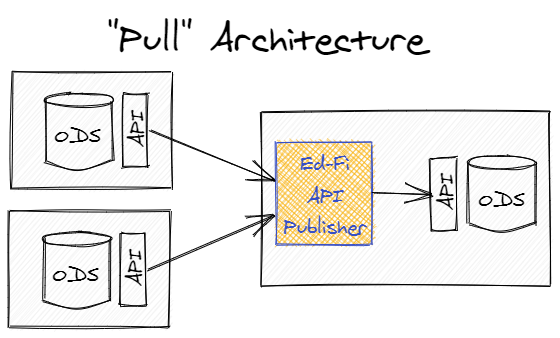
Operationally, it can be used in a "Pull" model where it is deployed alongside a target (central) API and gathers data from multiple source APIs.
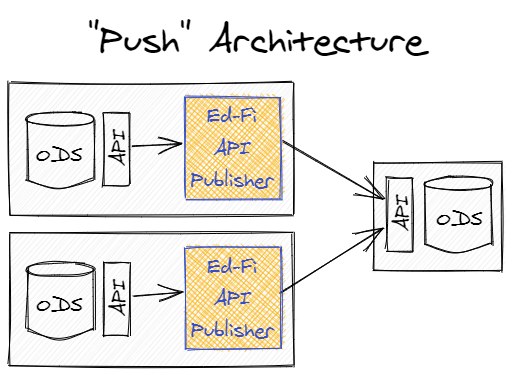
Alternatively, it could also be used in a "Push" model where the utility is deployed alongside the source APIs and pushes data to the central target.
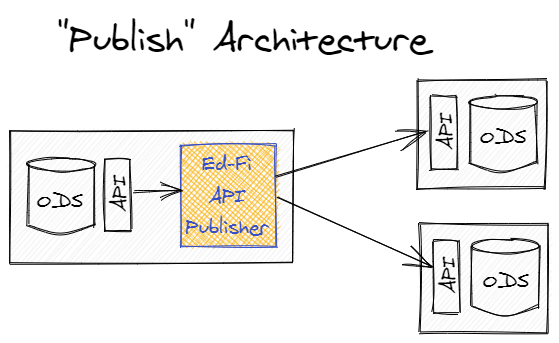
However, it can also be used in a "Publishing" model where it is installed alongside a source API and pushes data to multiple targets (e.g. to both a State Education Agency and a collaborative).
If a source API supports the "Change Queries" feature, the Ed-Fi API Publisher will perform a full publishing of the source data on the first run, and then will only publish changed data to the target on subsequent runs. The change versions that have been published to a particular target are maintained in a configuration store automatically for each source/target combination.
What's New
Version 1.4 runs on .NET 10, adds support for Ed-Fi API v8, and reads Ed-Fi ODS/API 7.3 and later sources with cursor paging. See What's New for details.
Quick Start
To demonstrate how the API Publisher works, this exercise copies the data of the Populated Template sandbox to the Minimal Template sandbox of a local Ed-Fi ODS/API 7.3 sandbox on Windows with SQL Server. Both sandboxes are served by the same API, and each one has its own API client.
Prerequisites
An Ed-Fi ODS/API 7.3 sandbox on Windows with SQL Server, installed by following the Sandbox Installation Steps after the prerequisites listed in Binary Installation. This Quick Start covers only the installation and use of the API Publisher. It uses an Ed-Fi ODS/API sandbox; to publish to or from Ed-Fi API v8, see Considerations for API Hosts.
Configure Local Sandbox Environment
-
Find the keys and secrets of the Populated Template and Minimal Template sandboxes in the
Usersection ofC:\inetpub\Ed-Fi\SandboxAdmin\appsettings.json. -
Configure the API clients of both sandboxes. The script below assigns the
Ed-Fi API Publisher - Writerclaim set to the Minimal Template client and associates both clients with the education organizations of the Populated Template data: Grand Bend ISD (255901), Communities in Schools of Grand Bend (19255901) and three schools of education (5,6and7) whose courses are used by Grand Bend course offerings. Run it against the SQL Server that hosts theEdFi_Admindatabase, for example in SQL Server Management Studio:SET NOCOUNT ON;SET XACT_ABORT ON;DECLARE @Clients TABLE (ApplicationName nvarchar(255), ApiClientName nvarchar(50));INSERT INTO @Clients VALUES('Default Sandbox Application Sample', 'Populated Demonstration Sandbox'),('Default Sandbox Application Minimal', 'Minimal Demonstration Sandbox');DECLARE @EducationOrganizations TABLE (EducationOrganizationId bigint);INSERT INTO @EducationOrganizations VALUES (255901), (19255901), (5), (6), (7);BEGIN TRANSACTION;IF (SELECT COUNT(*) FROM EdFi_Admin.dbo.ApiClients cJOIN EdFi_Admin.dbo.Applications a ON a.ApplicationId = c.Application_ApplicationIdJOIN @Clients x ON x.ApplicationName = a.ApplicationName AND x.ApiClientName = c.Name) <> 2THROW 50000, 'Unable to find both sandbox API clients in the EdFi_Admin database.', 1;UPDATE EdFi_Admin.dbo.ApplicationsSET ClaimSetName = 'Ed-Fi API Publisher - Writer'WHERE ApplicationName = 'Default Sandbox Application Minimal';INSERT INTO EdFi_Admin.dbo.ApplicationEducationOrganizations (Application_ApplicationId, EducationOrganizationId)SELECT a.ApplicationId, e.EducationOrganizationIdFROM EdFi_Admin.dbo.Applications aJOIN @Clients x ON x.ApplicationName = a.ApplicationNameCROSS JOIN @EducationOrganizations eWHERE NOT EXISTS (SELECT 1 FROM EdFi_Admin.dbo.ApplicationEducationOrganizations aeoWHERE aeo.Application_ApplicationId = a.ApplicationIdAND aeo.EducationOrganizationId = e.EducationOrganizationId);INSERT INTO EdFi_Admin.dbo.ApiClientApplicationEducationOrganizations(ApiClient_ApiClientId, ApplicationEducationOrganization_ApplicationEducationOrganizationId)SELECT c.ApiClientId, aeo.ApplicationEducationOrganizationIdFROM EdFi_Admin.dbo.ApiClients cJOIN EdFi_Admin.dbo.Applications a ON a.ApplicationId = c.Application_ApplicationIdJOIN @Clients x ON x.ApplicationName = a.ApplicationName AND x.ApiClientName = c.NameJOIN EdFi_Admin.dbo.ApplicationEducationOrganizations aeo ON aeo.Application_ApplicationId = a.ApplicationIdWHERE NOT EXISTS (SELECT 1 FROM EdFi_Admin.dbo.ApiClientApplicationEducationOrganizations caeoWHERE caeo.ApiClient_ApiClientId = c.ApiClientIdAND caeo.ApplicationEducationOrganization_ApplicationEducationOrganizationId = aeo.ApplicationEducationOrganizationId);COMMIT TRANSACTION;
Use the API Publisher
The API Publisher has three options to use the product. It runs on .NET 10.0:
Option 1 - From binaries
- Download the latest published API Publisher package here: Ed-Fi API Publisher v1.4.0. Visit the page and click download.
- This will download a NuGet package to your computer. Right-click the file,
select Properties, check Unblock and click OK, so that Windows
does not block the files extracted from it. Then rename the file,
EdFi.ApiPublisher.1.4.0.nupkg, to include .zip extension:EdFi.ApiPublisher.1.4.0.zip. - Extract the ZIP file. It contains two folders:
EdFi.ApiPublisher.Win64:EdFiApiPublisher.exefor Windows. It includes the .NET runtime, so no separate installation is needed. The Quick Start command below uses it.EdFi.ApiPublisher: for any operating system. It requires the .NET 10 runtime and runs withdotnet EdFiApiPublisher.dll.
Option 2 - From Docker img
The Docker image for the Ed-Fi API Publisher is available here: Ed-Fi API Publisher tag v1.4.0 on Docker Hub. Use this to include in your Docker environment and alongside other components of the Ed-Fi stack. The image includes the .NET runtime. To build and run the API Publisher with Docker Compose, see Running in Docker Desktop.
Option 3 - Build the API Publisher from source code
Building from source requires the
.NET 10 SDK. Build
the solution by running the following command from the repository's src
directory:
dotnet build
The API Publisher executable (EdFiApiPublisher.exe) will be located in the
.\EdFi.Tools.ApiPublisher.Cli\bin\Debug\net10.0 subfolder.
Publish Data to Local Sandbox
The following table shows the command-line arguments used for publishing.
| Parameter | Value |
|---|---|
--sourceUrl | https://localhost/WebApi/ |
--sourceKey | Populated Template sandbox key |
--sourceSecret | Populated Template sandbox secret |
--targetUrl | https://localhost/WebApi/ |
--targetKey | Minimal Template sandbox key |
--targetSecret | Minimal Template sandbox secret |
--ignoreSslErrors | true |
--ignoreIsolation | true |
--includeDescriptors | true |
--ignoreSslErrors=trueaccepts the self-signed certificate of the local sandbox. Use it only with a local environment, never with an API that has a valid certificate.--ignoreIsolation=truepublishes without a snapshot, which the sandbox does not provide. See Sources Without a Configured Snapshot.
Run the Ed-Fi API Publisher from the EdFi.ApiPublisher.Win64 folder,
substituting the keys and secrets from the Sandbox Admin appsettings.json
file:
.\EdFiApiPublisher.exe --sourceUrl=https://localhost/WebApi/ `
  --sourceKey=populated_sandbox_key `
  --sourceSecret=populated_sandbox_secret `
  --targetUrl=https://localhost/WebApi/ `
  --targetKey=minimal_sandbox_key `
  --targetSecret=minimal_sandbox_secret `
  --ignoreSslErrors=true `
  --ignoreIsolation=true `
  --includeDescriptors=true
When the run finishes, the publisher prints a summary of the documents
attempted, published and failed for each resource. A successful run exits with
code 0. See
Run outcome and exit codes.
For more documentation on API Publisher's parameters, please see the API Publisher Configuration markdown file for other runtime options.
For more information in relation to key changes and deletes, please see Considerations in relation to key changes and deletes
Known Issues
Usage notes and known issues for version 1.4 are described in Known Issues Details.
Next Steps
When you're ready to look further, review these other topics:
- API Connection Management
- API Publisher Configuration
- Considerations for API Hosts
- Running in Docker Desktop
- How to use the TextFormatter class.
Support
For support with the API Publisher, please use Ed-Fi Support to open a support case and/or feature request.