Single/Multi Tenant Installation Steps
This section describes how to set up the Ed-Fi ODS / API in single/multi tenant mode. Before you proceed, make sure you have installed the prerequisites listed in Getting Started - Binary Installation.
Step 1. Download the Ed-Fi ODS / API Installer Packages
The Ed-Fi ODS / API installation packages can be downloaded from the following links:
Package Links
The required release packages to install the Ed-Fi ODS / API can be found at the links below. We recommend you stay current with the latest patch update that has been promoted to release.
- EdFi.Suite3.Installer.WebApi
- EdFi.Suite3.Installer.SwaggerUI (Optional, not for production)
- EdFi.Suite3.RestApi.Databases
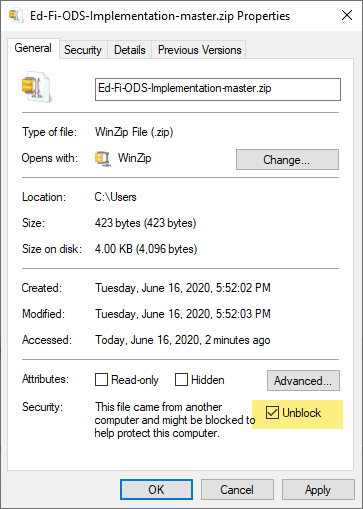
For each of the downloads, right-click and select "Properties." Update the file extension (from .nupkg to .zip). Remove the version number (optional). Check the box next to Unblock (this will prevent PowerShell from asking for permission to load every module in the installer) and click OK.
You may need to configure TLS while running the installation scripts described
in steps below.
[Net.ServicePointManager]::SecurityProtocol += [Net.SecurityProtocolType]::Tls12
File paths can become lengthy within the ODS/API package components. In Windows,
this may cause errors during deployment. To mitigate this, consider extracting
the packages close to the root directory (e.g., C:\temp) while running the
installation steps below. Doing so minimizes the risk of encountering
excessively long file paths. Alternatively, you can enable long paths in
Windows.
Step 2. Install the Ed-Fi Databases
Extract the contents of the EdFi.Suite3.RestApi.Databases package. The paths in
these instructions assume that the package was extracted to a folder with the
name of the package (e.g., C:\\temp\\EdFi.Suite3.RestApi.Databases).
Edit the configuration.json File
There are several settings in the configuration file that are left empty as they depend on whether you are opting of SQL Server or PostgreSQL backend. Update the settings by consulting the samples provided below.
- SQL Server
- PostgreSQL
- SQL Server (MultiTenant)
- PostgreSQL (MultiTenant)
{
  "ConnectionStrings": {
      "EdFi_Ods": "server=(local);trusted_connection=True;database=EdFi_{0};Application Name=EdFi.Ods.WebApi",
      "EdFi_Security": "server=(local);trusted_connection=True;database=EdFi_Security;persist security info=True;Application Name=EdFi.Ods.WebApi",
      "EdFi_Admin": "server=(local);trusted_connection=True;database=EdFi_Admin;Application Name=EdFi.Ods.WebApi",
      "EdFi_Master": "server=(local);trusted_connection=True;database=master;Application Name=EdFi.Ods.WebApi"
  },
  "InstallType": "SingleTenant",
  "ApiSettings": {
      "Engine": "SQLServer",
      ...
      "MinimalTemplateScript": "TPDMCoreMinimalTemplate",
      "PopulatedTemplateScript": "TPDMCorePopulatedTemplate"
  }
}
{
  "ConnectionStrings": {
      "EdFi_Ods": "host=localhost;port=5432;username=postgres;database=EdFi_{0};Application Name=EdFi.Ods.WebApi",
      "EdFi_Security": "host=localhost;port=5432;username=postgres;database=EdFi_Security;Application Name=EdFi.Ods.WebApi",
      "EdFi_Admin": "host=localhost;port=5432;username=postgres;database=EdFi_Admin;Application Name=EdFi.Ods.WebApi",
      "EdFi_Master": "host=localhost;port=5432;username=postgres;database=postgres;Application Name=EdFi.Ods.WebApi"
  },
  "InstallType": "SingleTenant",
  "ApiSettings": {
      "Engine": "PostgreSQL",
      ...
      "MinimalTemplateScript": "TPDMCorePostgreSqlMinimalTemplate",
      "PopulatedTemplateScript": "TPDMCorePostgreSqlPopulatedTemplate"
  }
}
{
  "InstallType": "MultiTenant",
  "ApiSettings": {
      "Engine": "SQLServer",
      "OdsTokens": "Tenant1ODS;Tenant2ODS",
      "Features": [
        ...
        {
            "IsEnabled": true,
            "Name": "MultiTenancy"
        },
        ...
      ]
  },
  "Tenants" : {
    "Tenant1": {
        "ConnectionStrings": {
            "EdFi_Security":  "server=(local);trusted_connection=True;database=EdFi_Security_Tenant1;persist security info=True;application name=EdFi.Ods.WebApi;encrypt=False",
            "EdFi_Admin":  "server=(local);trusted_connection=True;database=EdFi_Admin_Tenant1;application name=EdFi.Ods.WebApi;encrypt=False"
        }
      },
    "Tenant2": {
        "ConnectionStrings": {
            "EdFi_Security":  "server=(local);trusted_connection=True;database=EdFi_Security_Tenant2;persist security info=True;application name=EdFi.Ods.WebApi;encrypt=False",
            "EdFi_Admin":  "server=(local);trusted_connection=True;database=EdFi_Admin_Tenant2;application name=EdFi.Ods.WebApi;encrypt=False"
        }
      }
  }
}
{
  "InstallType": "MultiTenant",
  "ApiSettings": {
      "Engine": "PostgreSQL",
      "OdsTokens": "Tenant1ODS;Tenant2ODS",
      "Features": [
        ...
        {
            "IsEnabled": true,
            "Name": "MultiTenancy"
        },
        ...
      ]
  },
  "Tenants" : {
    "Tenant1": {
        "ConnectionStrings": {
            "EdFi_Security":  "host=localhost;port=5432;username=postgres;database=EdFi_Security_Tenant1;application name=EdFi.Ods.WebApi",
            "EdFi_Admin":  "host=localhost;port=5432;username=postgres;database=EdFi_Admin_Tenant1;application name=EdFi.Ods.WebApi"
        }
      },
    "Tenant2": {
        "ConnectionStrings": {
            "EdFi_Security":  "host=localhost;port=5432;username=postgres;database=EdFi_Security_Tenant2;application name=EdFi.Ods.WebApi",
            "EdFi_Admin":  "host=localhost;port=5432;username=postgres;database=EdFi_Admin_Tenant2;application name=EdFi.Ods.WebApi"
        }
      }
  }
}
Optional: custom extension Plugin deployment steps...
Copy your extension plugin to database deployment package
If you have an extension plugin package that you would like to be the deployed to Ed-Fi Databases, place the extracted contents of your extension plugin package in the extracted EdFi.Suite3.RestApi.Databases package under Ed-Fi-ODS-Implementation\Plugin folder.
edfi.suite3.restapi.databases/
├─ Ed-Fi-ODS-Implementation/
│  ├─ Plugin/
│    ├─ [Your Extension Package Extract]/
│    ├─ homograph.ps1
│    ├─ profiles.sample.ps1
│    ├─ sample.ps1
│    ├─ tpdm.ps1
Enable your extension plugin in the deployment configuration
Edit the Plugin section of the configuration file and update the Folder and Scripts values to the following:
"Plugin": {
    "Folder": "../../Plugin",
    "Scripts": [
    ]
  }
Run Installation Script
Open a PowerShell window in Administrator mode and navigate to the EdFi.Suite3.RestApi.Databases package folder.
Run the following PowerShell command to load modules for installation:
Import-Module .\Deployment.psm1
Next, execute the following command in PowerShell:
Initialize-DeploymentEnvironment
Step 3. Install WebApi
Extract the contents of the EdFi.Suite3.Installer.WebApi package. The paths in these instructions assume that the package was extracted to a folder with the name of the package (e.g., C:\temp\EdFi.Suite3.Installer.WebApi).
Prepare Installation script
Open a PowerShell window in Administrator mode and navigate to the EdFi.Suite3.Installer.WebApi package folder. Run the following PowerShell command to load modules for installation:
Import-Module .\Install-EdFiOdsWebApi.psm1
The WebApi installer can take a number of parameters to tailor the installation experience (more examples can be found in the Install-EdFiOdsWebApi.psm1 file). At a minimum, database connection info is required.
Copy and modify the following parameter code to fit your connection information:
- SQL Server
- PostgreSQL
- SQL Server (MultiTenant)
- PostgreSQL (MultiTenant)
$parameters = @{
    PackageVersion = "6.2.2456"
    PackageName = "EdFi.Suite3.Ods.WebApi"
    DbConnectionInfo = @{
        Engine="SqlServer"
        Server="localhost"
        UseIntegratedSecurity=$true
    }
    UnEncryptedConnection = $true
}
$parameters = @{
    PackageVersion = "6.2.2456"
    PackageName = "EdFi.Suite3.Ods.WebApi"
    DbConnectionInfo = @{
        Engine="PostgreSQL"
        Server="localhost"
        Username="postgres"
    }
}
$parameters = @{
    IsMultiTenant = $true
    PackageVersion = "6.2.2456"
    PackageName = "EdFi.Suite3.Ods.WebApi"
    DbConnectionInfo = @{
        Engine="SqlServer"
        Server="localhost"
        UseIntegratedSecurity=$true
    }
    UnEncryptedConnection = $true
    Tenants = @{
        Tenant1 = @{
            AdminDatabaseName = "EdFi_Admin_Tenant1"
            SecurityDatabaseName = "EdFi_Security_Tenant1"
        }
        Tenant2 = @{
            AdminDatabaseName = "EdFi_Admin_Tenant2"
            SecurityDatabaseName = "EdFi_Security_Tenant2"
        }
    }
}
$parameters = @{
    IsMultiTenant = $true
    PackageVersion = "6.2.2456"
    PackageName = "EdFi.Suite3.Ods.WebApi"
    DbConnectionInfo = @{
        Engine="PostgreSQL"
        Server="localhost"
        Username="postgres"
    }
    Tenants = @{
        Tenant1 = @{
            AdminDatabaseName = "EdFi_Admin_Tenant1"
            SecurityDatabaseName = "EdFi_Security_Tenant1"
        }
        Tenant2 = @{
            AdminDatabaseName = "EdFi_Admin_Tenant2"
            SecurityDatabaseName = "EdFi_Security_Tenant2"
        }
    }
}
UnEncryptedConnection = $true will add Encrypt=false to the connection strings to mitigate a breaking change in the Microsoft.Data.SqlClient library. This setting is not recommended for production environments; for production environments, it is recommended to follow the steps to Install a valid certificate on the server.
By default, an Encryption key will be generated using member New-AESKey from
Install-EdFiOdsWebApi.psm1 module. If you need to override the value with an
specific key, add OdsConnectionStringEncryptionKey parameter. Key must be 256
bits and base 64 encoded.
To enable
Context-Based Routing for Year-Specific ODS,
set a valid value for OdsContextRouteTemplate parameter. An example of a valid
value is {schoolYearFromRoute:range(2020,2030)} Where schoolYear is the Route
section, and the range will accept values between 2020 and 2030
Paste the modified parameter code into your PowerShell window and hit Enter.
Run the Installation Script (Web API)
Run the following command in the PowerShell window:
Install-EdFiOdsWebApi @parameters
Optional: Click here to see custom extension Plugin deployment steps...
Copy your extension plugin to deployed WebAPI
If you have an extension plugin package that you would like to be the deployed to Ed-Fi WebApi, place the extracted contents of your extension plugin package in C:\inetpub\Ed-Fi\WebApi\Plugin folder.
inetpub/
├─ Ed-Fi/
│  ├─ WebApi/
│    ├─ Plugin/
│      ├─ [Your Extension Package Extract]
Enable your extension plugin in appsettings.json
Open the appsettings.json file found in C:\inetpub\Ed-Fi\WebApi.
Edit the Plugin section of the configuration file and update the Folder and Scripts values to the following:
"Plugin": {
    "Folder": "./Plugin",
    "Scripts": [
    ]
  }
Step 4. Install Swagger
Extract the contents of the "EdFi.Suite3.Installer.SwaggerUI" package. The paths in these instructions assume that the package was extracted to a folder with the name of the package (e.g., C:\temp\EdFi.Suite3.Installer.SwaggerUI).
Prepare Installation Script
Open a PowerShell window in Administrator mode and navigate to the "EdFi.Suite3.Installer.SwaggerUI" folder. Run the following PowerShell command to load modules for installation:
Import-Module .\Install-EdFiOdsSwaggerUI.psm1
The Swagger UI installer can take a number of parameters to tailor the install experience (more examples can be found in the Install-EdFiOdsWebApi.psm1 file). At a minimum, WebAPI connection information is required.
Copy and modify the following parameter code to add your site name:
$parameters = @{
    PackageVersion = "6.2.26"
    WebApiVersionUrl = "https://YOUR_SITE_OR_SERVER_NAME_HERE/WebApi"
}
Paste the modified parameter into your PowerShell window and execute the code.
To deploy Swagger for MultiTenant, use parameters Tenants and DefaultTenant
(Optional. Used to specify one tenant to be displayed as default).
$parameters = @{
    PackageVersion = "6.2.26"
    WebApiVersionUrl = "https://YOUR_SITE_OR_SERVER_NAME_HERE/WebApi"
    Tenants = @("Tenant1", "Tenant2")
}
If deploying multiple school years, OpenApi Metadata will include available school years.
Run the Installation Script (Swagger UI)
Run the following command in the PowerShell window:
Install-EdFiOdsSwaggerUI @parameters
Step 5. Install Admin API
The Admin API provides an API-based programmatic interface for platform hosts to administer and manage non-sandbox instances of the Ed-Fi ODS / API. Follow the installation steps here. API keys and secrets can be administered via SQL queries as outlined in the article How To: Configure Key / Secret.
Step 6. Restart your Website
Just a few more tasks to complete your installation:
- Open IIS (Press the Windows key 🪟 on your keyboard, type IIS, select Internet Information Services (IIS), and press Enter.
- Right-click on the server (alternatively, you can right-click the EdFi web site), and select Stop.
- Right-click the server (or EdFi website) again and select Start.
You are now ready to use the Ed-Fi ODS / API. The following URLs are available:
| Website | URL |
|---|---|
| Ed-Fi ODS / API | https://YOUR\_SERVER\_NAME\_HERE/WebApi |
| Ed-Fi ODS Admin API | https://YOUR\_SERVER\_NAME\_HERE/AdminApi |
| Ed-Fi ODS / API Documentation (Optional, not for production) | https://YOUR\_SERVER\_NAME\_HERE/SwaggerUI |
Contents
Find out more about how to begin using the Ed-Fi ODS / API: