Working with Code Generation
The Code Generation utility is a .NET 8.0 command-line application that has been
integrated into the Ed-Fi ODS / API initdev process. Its responsibility is to generate C# classes, ORM mapping files for
the core application, plus all profiles and extensions. It uses logic-less
{{mustache}} templates that are embedded within the assembly to generate the files. The
application depends on Castle Windsor for its container.
The code generation tool is located in the ODS repository under the folder Utilities\CodeGeneration.
Requirements
The following are required to build the application:
- Visual Studio 2022 / JetBrains Rider 2021.3
- .NET 8.0
Template Model
Template models generate an anonymous object to drive the mustache template. All
template models implement the interface ITemplateModel, and these models are then installed into the container to be run.
To add a new template model:
- Create a new class in the TemplateModels namespace.
- Utilize the Template Method Pattern and inherit from
TemplateModelBase. - Implement the
BuildTemplateModel()method. - Optionally, implement the
Configure()method, if pre-processing is necessary. - Optionally, add a Constructor for any dependencies to be injected.
The code below shows an example template model:
Expand source
public class EdOrgIdModel : TemplateModelBase
{
    public EdOrgIdModel(ISchemaReader schemaReader, ITemplateContextProvider templateContextProvider)
        : base(schemaReader, templateContextProvider) { }

    protected override object BuildTemplateModel()
    {
        return new
        {
            educationOrganizationIds = TemplateContext.EntitiesWithPropertyNamed("EducationOrganizationId")
                .Where(e => e.IsDescriptor() == false && e.IsLookup() == false && e.Entity.IsMappedEntity)
                .Select(e => e.Schema.FullName)
                .OrderBy(n => n)
                .Distinct()
                .ToList()
        };
    }
}
Assembly Metadata
The utility introduces a new file within each assembly root folder that requires code generation, the assemblyMetadata.json file:
Expand source
{
  "assemblyModelType": "EdFi.Ods.Standard",
  "assemblyMetadataFormatVersion": "1.0.0"
}
assemblyModelTypemaps the to the template set to generate.assemblyMetadataFormateVersionis the semantic version of the file.
For backward compatibility, profiles and extensions are also picked up using conventions. This may be removed in the future.
Template Sets
Template Sets are a grouping of Template Models that are to be rendered. This grouping is stored in an embedded object named TemplateSets.json which contains an array of TemplateSet objects.
Expand source
{
  "name": "Ed-Fi Extensions",
  "driver": "AssemblyModel",
  "outputPath": "",
  "outputName": "no-output",
  "templateSets": [
    {
      "name": "Views",
      "driver": "EntityViews",
      "outputPath": "Entities",
      "outputName": "EntityViews.generated.cs"
    }
  ]
}
- Name is the name of the template.
- Driver is the C# Template Model.
- OutputName is the file name that is created.
- OutputPath is the location within the assembly to which the file is written.
The listing below shows the TemplateSets.json contents:
Expand source
[
  {
    "name": "EdFi.Ods.Standard",
    "driver": "AssemblyModel",
    "outputPath": "",
    "outputName": "no-output",
    "templateSets": [
      {
        "name": "Markers",
        "driver": "MarkerInterfaces",
        "outputPath": "Marker",
        "outputName": "Marker.generated.cs"
      },
      {
        "name": "Entities",
        "driver": "EntityModel",
        "outputPath": "Entities",
        "outputName": "Entities.generated.cs"
      },
      {
        "name": "Requests",
        "driver": "RequestModel",
        "outputPath": "Requests",
        "outputName": "Requests.generated.cs"
      },
      {
        "name": "Views",
        "driver": "EntityViews",
        "outputPath": "Entities",
        "outputName": "EntityViews.generated.cs"
      },
      {
        "name": "Database",
        "driver": "DatabaseViews",
        "outputPath": "Entities",
        "outputName": "DatabaseViews.generated.hbm.xml"
      },
      {
        "name": "OrmMappings",
        "driver": "OrmMappings",
        "outputPath": "Entities",
        "outputName": "Entities.generated.hbm.xml"
      },
      {
        "name": "EntitiesForQueries",
        "driver": "EntitiesForQueries",
        "outputPath": "Entities",
        "outputName": "EntitiesForQueries.generated.hbm.xml"
      },
      {
        "name": "EntitiesForQueriesViews",
        "driver": "EntitiesForQueriesViews",
        "outputPath": "Entities",
        "outputName": "EntitiesForQueriesViews.generated.hbm.xml"
      },
      {
        "name": "EdOrgIds",
        "driver": "EdOrgIdModel",
        "outputPath": "Entities",
        "outputName": "EdOrgIds.generated.cs"
      }
    ]
  }
]
Command Line Parameters
The tool accepts the following command line argument:
-r <repository path>. The repository path to the location of the solution (e.g., C:\EdFi\v3).
Building Code Generation
The solution can be built using Visual Studio 2022 or Rider 2021.3. Also, it can
be built from the command line using the following command: dotnet build.

Running Tests
Tests can be run using Visual Studio Test Explorer, R# Test Runner of Rider
2021.3. Alternatively, the tests can be run using the command dotnet test.

Running Approval Tests
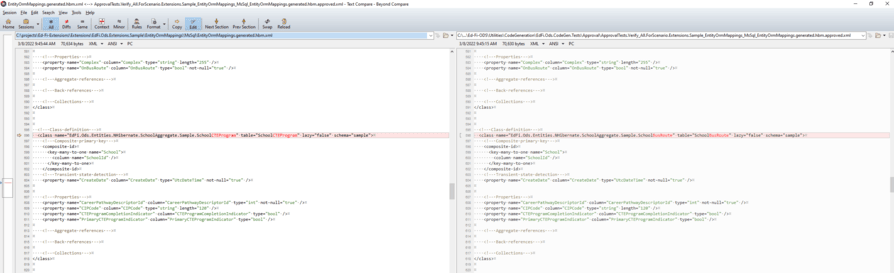
Included in the testing suite are approval tests that validate the code generated is as expected.
To run the tests, the following steps are required:
Step 1: Build the solution with Visual Studio.
Step 2: Set EdFi.Ods.Codegen.Console as the startup project. Note that the command argument is not necessary.
Step 3: Run the solution within Visual Studio.

Step 4: Open Test Explorer and look for the Verify_All test and run it to see if there are any failures
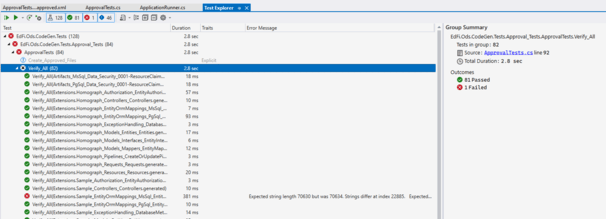
Step 5: Approve any changes, if appropriate.