API Profiles
An API Profile enables the creation of a data policy for a particular set of API Resources, generally in support of a specific usage scenario (such as for Nutrition or Special Education specialty applications).
The policy is expressed as a set of rules for explicit inclusion or exclusion of properties, references, collections, and/or collection items (based on Type or Ed-Fi Descriptor values) at all levels of a Resource. Profiles are managed through the Configuration Service API. Profile definitions are stored in the Configuration Service database and are dynamically applied without any API process restart.
The refresh period for dynamically defined profiles is controlled by the
CacheSettings:ProfileCacheExpirationSeconds setting (in seconds) in the Ed-Fi
API configuration, which defaults to 1800 seconds (30 minutes):
"CacheSettings": {
    "ProfileCacheExpirationSeconds": 1800
}
Profiles can be assigned to API consumer applications through the Configuration Service API to ensure that all requests made by the consumer for Resources covered by the Profile's data policy use the Profile-specific content types, and thus are appropriately constrained.
The API evaluates each request to determine if the resource requested by the API
consumer is covered by a single assigned Profile, and if so, it will
implicitly process the request using that Profile. A Profile covers a request
when it has a ReadContentType (for GET) or a WriteContentType (for POST
and PUT) for the requested resource. If more than one assigned Profile covers
the request, or the API consumer is simply choosing to use a particular Profile,
the API consumer must specify which Profile is to be used by adding the
appropriate HTTP header
to the request (i.e. Accept for GET requests, and Content-Type for
PUT/POST requests).
The API returns these errors when Profile usage is invalid:
400 Bad Request(urn:ed-fi:api:profile:invalid-profile-usage): the Profile media type is malformed, names a different resource than the one requested, or uses the wrong usage type for the method (awritabletype on aGET, or areadabletype on aPOSTorPUT). It's also returned when the header names a Profile that doesn't include the requested resource and none of the client's assigned Profiles cover it; if assigned Profiles do cover it, the response is403instead.405 Method Not Allowed(urn:ed-fi:api:profile:method-usage): the Profile has no read content type for the resource (on aGET) or no write content type (on aPOSTorPUT).403 Forbidden(urn:ed-fi:api:security:data-policy:incorrect-usage): more than one assigned Profile covers the request and no Profile header was sent, or the header names a Profile that isn't assigned to the API client (or doesn't include the resource) while other assigned Profiles cover the resource. The error message lists the content types the client can use.406 Not Acceptable(GET) or415 Unsupported Media Type(POST/PUT), withurn:ed-fi:api:profile:invalid-profile-usage: the header names a Profile that doesn't exist, or one that failed to load (see Profile Definition).503 Service Unavailable: the Ed-Fi API couldn't reach the Configuration Service to load Profiles. Retry later.

Figure 1. Depiction of the inclusion of all properties

Figure 2. Depiction of the inclusion of specific properties

Figure 3. Depiction of the inclusion of a specific collection

Figure 4. Depiction of the inclusion or exclusion of specific collection items

Figure 5. Depiction of the inclusion of specific properties on a child collection's items
Include-Only vs. Exclude-Only Strategies
Platform implementers can choose to configure access by inclusion or exclusion, but it's useful to understand the implications of using IncludeOnly vs. ExcludeOnly member selection modes when defining Profiles.
If the IncludeOnly value is used exclusively, a very rigid Profile definition will result. As new elements are added to the data model (either through an implementer extending the data model or when upgrading to a new version of the Ed-Fi Data Standard), none of these added data elements will be included. However, if the Profile is defined using ExcludeOnly then these other elements will be automatically included, resulting in a more flexible definition that will not necessarily require adjustments over time. The implications of these two approaches is depicted in the diagram below:
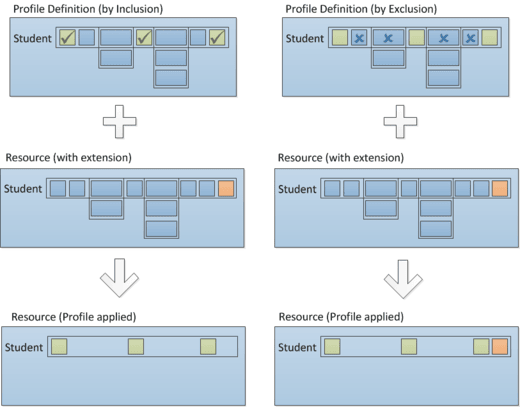
Figure 6. Depiction of the implications on Profile flexibility using Inclusion vs. Exclusion
Profile Definition
The Profile Definition is expressed in XML. Resources are named as in the
Ed-Fi data model (for example, School). Members are named exactly as they
appear in the resource's JSON payload, in camelCase: for example,
nameOfInstitution, charterApprovalSchoolYearTypeReference, addresses, and
gradeLevels. Names are case-sensitive. PascalCase names from ODS/API Profiles
(NameOfInstitution, EducationOrganizationAddresses) won't match.
- Use
Propertyfor scalar values, descriptors, and references (such aslocalEducationAgencyReference). - Use
Collectionfor arrays (such asaddressesorgradeLevels), withPropertyelements inside it for the members of each item. - Use
Objectfor embedded objects andExtensionfor extension members.
The id, _etag, _lastModifiedDate, and link fields are generated by the
server and can't be named in a Profile.
The Profile XML schema is available in the source code repository at API-Profile.xsd. This file serves as a useful reference when authoring profile definitions.
The Ed-Fi API checks each Profile against the API schema when it loads it:
- A Profile that names a resource that doesn't exist, or that names an unknown
member in an
IncludeOnlyselection, isn't loaded. The Ed-Fi API logs a message and skips it. Requests that name it in a header get406or415. - An unknown member in an
ExcludeOnlyselection only logs a warning, so a misspelled name silently excludes nothing. - Listing an identity member (such as
schoolId) in anExcludeOnlyselection logs a warning. Identity members are always included.
If a Profile that's assigned to an API client fails to load, the Ed-Fi API ignores the assignment and serves that client's requests without the Profile. Check the Ed-Fi API log for Profile validation errors after you create or update a Profile.
The memberSelection attribute accepts IncludeOnly, ExcludeOnly, and
IncludeAll. ExcludeAll isn't supported and is treated as IncludeAll. To
make a resource read-only or write-only, omit its WriteContentType or
ReadContentType.
A Profile Definition can consist of multiple Resources (e.g., School and Student):
<!-- Multiple resources -->
<Profile name="Test-Profile-Student-and-School-Include-All">
 <Resource name="School">
  <ReadContentType memberSelection="IncludeAll" />
  <WriteContentType memberSelection="IncludeAll" />
 </Resource>
 <Resource name="Student">
  <ReadContentType memberSelection="IncludeAll" />
  <WriteContentType memberSelection="IncludeAll" />
 </Resource>
</Profile>
Resources can be readable or writable only:
<!-- Readable Only Profile-->
<Profile name="Test-Profile-Resource-ReadOnly">
 <Resource name="School">
  <ReadContentType memberSelection="IncludeAll" />
 </Resource>
</Profile>

<!-- Writable Only Profile-->
<Profile name="Test-Profile-Resource-WriteOnly">
 <Resource name="School">
  <WriteContentType memberSelection="IncludeAll" />
 </Resource>
</Profile>
Resource members can be explicitly included based on the member selection:
<!-- Resource-level IncludeOnly -->
<Profile name="Test-Profile-Resource-IncludeOnly">
 <Resource name="School">
  <ReadContentType memberSelection="IncludeOnly">
   <Property name="nameOfInstitution" />                               <!-- Property -->
   <Property name="operationalStatusDescriptor" />                     <!-- Descriptor -->
   <Property name="charterApprovalSchoolYearTypeReference" />          <!-- Reference -->
   <Property name="schoolTypeDescriptor" />                            <!-- Descriptor -->
   <Property name="administrativeFundingControlDescriptor" />          <!-- Descriptor -->
   <Collection name="addresses" memberSelection="IncludeAll" />        <!-- Collection -->
   <Collection name="schoolCategories" memberSelection="IncludeAll" /> <!-- Collection -->
  </ReadContentType>
  <WriteContentType memberSelection="IncludeOnly">
   <Property name="shortNameOfInstitution" />                          <!-- Property -->
   <Property name="operationalStatusDescriptor" />                     <!-- Descriptor -->
   <Property name="webSite" />                                         <!-- Property -->
   <Property name="charterStatusDescriptor" />                         <!-- Descriptor -->
   <Property name="administrativeFundingControlDescriptor" />          <!-- Descriptor -->
   <Collection name="internationalAddresses" memberSelection="IncludeAll" /> <!-- Collection -->
   <Collection name="gradeLevels" memberSelection="IncludeAll" />      <!-- Collection -->
  </WriteContentType>
 </Resource>
</Profile>
Resource members can be explicitly excluded based on the member selection:
<Profile name="Test-Profile-Resource-ExcludeOnly">
 <Resource name="School">
  <ReadContentType memberSelection="ExcludeOnly">
   <Property name="nameOfInstitution" />                               <!-- Property -->
   <Property name="operationalStatusDescriptor" />                     <!-- Descriptor -->
   <Property name="charterApprovalSchoolYearTypeReference" />          <!-- Reference -->
   <Property name="schoolTypeDescriptor" />                            <!-- Descriptor -->
   <Property name="administrativeFundingControlDescriptor" />          <!-- Descriptor -->
   <Collection name="addresses" memberSelection="ExcludeOnly">         <!-- Collection -->
    <Property name="nameOfCounty" />
   </Collection>
  </ReadContentType>
  <WriteContentType memberSelection="ExcludeOnly">
   <Property name="shortNameOfInstitution" />                          <!-- Property -->
   <Property name="operationalStatusDescriptor" />                     <!-- Descriptor -->
   <Property name="webSite" />                                         <!-- Property -->
   <Property name="charterStatusDescriptor" />                         <!-- Descriptor -->
   <Property name="administrativeFundingControlDescriptor" />          <!-- Descriptor -->
  </WriteContentType>
 </Resource>
</Profile>
A Collection element doesn't exclude the collection, even under
ExcludeOnly. It keeps the collection and applies its own rules to each item.
In the example above, read responses include addresses without
nameOfCounty.
The same inclusion/exclusion rules apply to child collections (e.g., the School's addresses):
<!-- Child collection IncludeOnly/ExcludeOnly profiles -->
<Profile name="Test-Profile-Resource-Child-Collection-IncludeOnly">
 <Resource name="School">
  <ReadContentType memberSelection="IncludeOnly">
   <Collection name="addresses" memberSelection="IncludeOnly">
    <Property name="city" />
    <Property name="stateAbbreviationDescriptor" />
    <Property name="postalCode" />
   </Collection>
  </ReadContentType>
  <WriteContentType memberSelection="IncludeAll">
   <Collection name="addresses" memberSelection="ExcludeOnly">
    <Property name="latitude" />
    <Property name="longitude" />
   </Collection>
  </WriteContentType>
 </Resource>
</Profile>
In a WriteContentType, collection rules must keep the members that identify
each item. For School addresses, those are addressTypeDescriptor, city,
postalCode, stateAbbreviationDescriptor, and streetNumberName. If a
writable Profile hides any of them, every POST and PUT that uses the Profile
fails with 500 Internal Server Error. A collection with
memberSelection="IncludeAll" is always safe.
The data policy can contain filters on child collection items (e.g., only include Physical and Shipping addresses). Filter values are full descriptor URIs, exactly as they appear in the JSON payload:
<!-- Child collection filtering on descriptors -->
<Profile name="Test-Profile-Resource-Child-Collection-Filtered-To-IncludeOnly-Specific-Descriptors">
 <Resource name="School">
  <ReadContentType memberSelection="IncludeOnly">
   <Collection name="addresses" memberSelection="IncludeOnly">
    <Property name="streetNumberName" />
    <Property name="city" />
    <Property name="stateAbbreviationDescriptor" />
    <Filter propertyName="addressTypeDescriptor" filterMode="IncludeOnly">
     <Value>uri://ed-fi.org/AddressTypeDescriptor#Physical</Value>
     <Value>uri://ed-fi.org/AddressTypeDescriptor#Shipping</Value>
    </Filter>
   </Collection>
  </ReadContentType>
 </Resource>
</Profile>
In the example above, GET requests will only return Physical and Shipping
addresses. If you add the same filter to a WriteContentType, a POST or PUT
that submits any other address type is rejected with a 400 Bad Request
(urn:ed-fi:api:bad-request:data-validation-failed) error. On PUT, stored
addresses of other types are kept.
Resource members that are part of the identity are automatically included in the
GET responses and must be included in the PUT and POST request bodies.
<!-- Resource-level IncludeOnly -->
<Profile name="Test-Profile-Resource-IncludeOnly">
 <Resource name="School">
  <ReadContentType memberSelection="IncludeOnly">
   <Property name="nameOfInstitution" />                               <!-- Property -->
   <Property name="operationalStatusDescriptor" />                     <!-- Descriptor -->
   <Property name="charterApprovalSchoolYearTypeReference" />          <!-- Reference -->
   <Property name="schoolTypeDescriptor" />                            <!-- Descriptor -->
   <Property name="administrativeFundingControlDescriptor" />          <!-- Descriptor -->
   <Collection name="addresses" memberSelection="IncludeAll" />        <!-- Collection -->
   <Collection name="schoolCategories" memberSelection="IncludeAll" /> <!-- Collection -->
  </ReadContentType>
  <WriteContentType memberSelection="IncludeOnly">
   <Property name="shortNameOfInstitution" />                          <!-- Property -->
   <Property name="operationalStatusDescriptor" />                     <!-- Descriptor -->
   <Property name="webSite" />                                         <!-- Property -->
   <Property name="charterStatusDescriptor" />                         <!-- Descriptor -->
   <Property name="administrativeFundingControlDescriptor" />          <!-- Descriptor -->
   <Collection name="internationalAddresses" memberSelection="IncludeAll" /> <!-- Collection -->
   <Collection name="gradeLevels" memberSelection="IncludeAll" />      <!-- Collection -->
  </WriteContentType>
 </Resource>
</Profile>
In the example above, the API includes schoolId in GET responses, and the
API client must include it in POST and PUT requests even though it wasn't
explicitly included in the definition.
When writing through a Profile:
- Members the Profile excludes are silently dropped from the request body. The request isn't rejected for including them.
- If the
WriteContentTypeexcludes a member that's required to create the resource (in the example above,nameOfInstitutionandeducationOrganizationCategories), aPOSTthat creates the resource fails with a400 Bad Request(urn:ed-fi:api:data-policy-enforced) error. Updates are still possible. - On
PUT, excluded members of collection items, and collection items excluded by a filter, keep their stored values.
Adding Profiles to the Ed-Fi API
Profiles are created and managed through the Configuration Service API at
/v3/profiles. Submit the profile name as the name field and the XML
definition as the definition field when creating or updating a profile record:
POST http://localhost:8081/config/v3/profiles
Content-Type: application/json
Authorization: Bearer <token>

{
  "name": "Test-Profile-Resource-ReadOnly",
  "definition": "<Profile name=\"Test-Profile-Resource-ReadOnly\"><Resource name=\"School\"><ReadContentType memberSelection=\"IncludeAll\" /></Resource></Profile>"
}
| Method | Path | Purpose |
|---|---|---|
GET | /v3/profiles | List profiles |
POST | /v3/profiles | Create a profile |
GET | /v3/profiles/{id} | Get a profile |
PUT | /v3/profiles/{id} | Update a profile |
DELETE | /v3/profiles/{id} | Delete a profile |
The Configuration Service rejects a create or update with a 400 Bad Request
error when:
nameis empty, longer than 500 characters, or doesn't exactly match thenameattribute of theProfileelement in the XML.- The XML doesn't validate against the Profile XSD.
- The XML has no
Resourceelement, or aResourceelement has noname. - Another profile in the same tenant already has the name.
The Configuration Service doesn't check resource or member names against the API schema. The Ed-Fi API does that when it loads the Profile (see Profile Definition).
Once created, a profile can be assigned to one or more applications by setting
the application's profileIds array when you create or update the application
(POST /v3/applications or PUT /v3/applications/{id}). A profile ID that
doesn't exist returns a 409 Conflict error. Deleting a profile that's still
assigned to an application also returns 409 Conflict; remove it from the
applications first.
In a multi-tenant deployment, profiles belong to a tenant:
- Send the
Tenantheader with each Configuration Service request. - Profile names only need to be unique within a tenant.
- An application can only be assigned profiles from its own tenant (a profile from another tenant is treated as missing), and the Ed-Fi API only applies profiles from the requesting client's tenant.